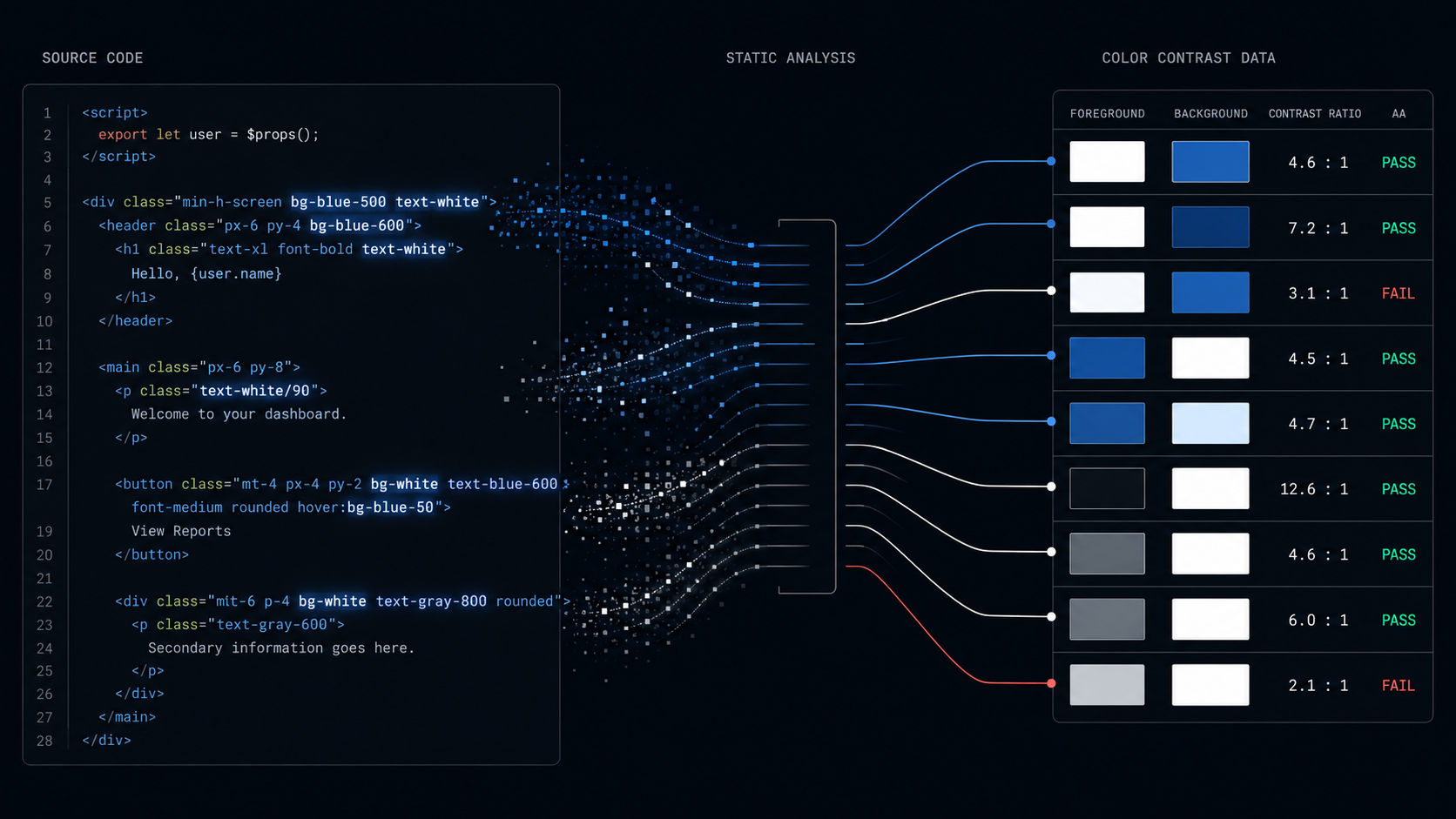
Accessibility isn't optional when you build software for schools. Under the European Accessibility Act, digital products and services across the EU must meet WCAG 2.2 AA.
The problem is that WCAG compliance is notoriously painful to verify. Many issues require either manual review, or slow and maintenance-heavy end-to-end tests. Contrast ratios in particular are tedious, they take an external auditor 5 seconds to catch, but are a constant maintenance burden for most product teams.
WCAG 2.2 AA requires:
The visual presentation of text and images of text has a contrast ratio of at least 4.5:1
The most common approach: spin up the app, open every page, run an audit tool, squint at the results, fix, repeat. It's manual, it's slow, and it breaks the moment someone pushes a new color token. You can do automated tests, but you have to ensure every page, component and view is rendered, and it's usually caught at the very end of the development process.
The Gradr Approach
We lean heavily on static code analysis at Gradr. Static checks like linting and type checking aren't coupled to a specific domain of your app. Instead they rely on patterns in your code, which means they scale across the entire codebase with minimal maintenance. We'll cover our broader static analysis philosophy in a future post, but contrast checking is a good example of pushing the approach to its limits.
Ensuring Sufficient Contrast Ratios
The first step is accepting the tradeoff. You have to know what color everything will be (or can be) at compile time, so runtime-dependent states need to be statically analyzable.
That means things like this:
<div class="text-white-500 bg-{isMain ? 'gray-300' : 'blue-500'}">
	{@render children()}
</div>
Has to become this:
{#if bgColor === 'gray-300'}
	<div class="text-white-500 bg-gray-300">
		{@render children()}
	</div>
{:else}
	<div class="text-white-500 bg-blue-500">
		{@render children()}
	</div>
{/if}
Note: You can construct even more sophisticated logic to allow some more dynamicism. For instance, our linter knows about file-contained snippets so you don't have to repeat yourself more than necessary. That being said, you have to draw the line somewhere, nothing comes for free in this world.
Likewise, background or text colors, cannot be placed inside <script> tags:
<script>
	const variants = {
		active: 'bg-blue-500',
		disabled: 'bg-gray-300',
		inactive: 'bg-gray-100',
		blocked: 'bg-red-500'
	};
</script>
These constraints may seem painful, but we're firm believers in the idea that clear intent and verbosity is completely fine, if it means tighter and safer code.
Component boundaries
The largest challenge (by far) is ensuring that components can communicate their state(s) to the static analysis tooling. Components inside of other components, or transparent/semi-transparent components that render on top of each other in the DOM.
This is solved by ensuring that all components clearly communicate how they are rendered, so the static analysis tooling can resolve this.
- Transparent components have to declare what text color(s) they render
- Components that accept snippets, have to declare on what background
- Semitransparent components have to declare what color(s) they render.
This works recursively, so a transparent component, that contains a transparent component, passes this color information along, to the next consumer.
Each component declares its color "layers" — the set of background and text color combinations it can produce. Here's a simplified example:
// InfoBox.svelte — color context declaration
//
// Each entry is a layer: a list of bg/text colors that coexist.
// The tooling walks these layers to compute effective contrast
// against whatever background the parent provides.
const layers = [
	// Layer 1: Blue and white text rendered directly (no own background)
	[{ text: 'white' }, { text: 'blue-500' }],
	// Layer 2: White text on a semi-transparent gray overlay
	[{ bg: 'gray-300/50' }, { text: 'white' }],
	// Layer 3: Dark red text on a semi-transparent red overlay
	[{ bg: 'red-300/50' }, { text: 'red-700' }]
];
When a parent renders <InfoBox/>, the tooling takes the parent's background color and composites each layer on top of it. For layer 1 (no own background), it checks white and blue-500 directly against the parent. For layers 2 and 3, it alpha-blends the semi-transparent background onto the parent first, then checks the text against the result. If any combination falls below 4.5:1, the CI blocks.
The consumer of InfoBox can then determine what backgrounds it is viable to render the component on. A similar system is used for components that accept snippets.
Linting, linting and more linting
To apply this at scale (and make sure agents actually follow it), everything is wrapped in a tight linting suite.
- no-conditional-color-class: Bans in-line conditional tailwind that involves bg or text color classes.
- no-color-classes-in-script: Bans color classes defined in <script> blocks, where the linter can't trace them to DOM context.
- require-color-context: Requires components to declare their color context (via bgColor/textColor props or contrast.dev.ts). Detects drift between template classes and the contrast file. Any time the linter cannot determine the bg + text color, this fires.
- wcag-color-contrast: The important (but easiest!) one, does the actual color computation. Verifies text-on-background contrast ratios meet WCAG AA.
Together, they form a tight system that ensures all color combinations are statically analyzable, and compliant with WCAG 2.2 AA.
Conclusion
With this system in place, we can effectively stop thinking about contrast ratios as a problem. And most importantly, dont have to double check each LLM-agents work for contrast issues manually. Non-compliant color combinations are simply not representable in our codebase. This is in line with our broader philosophy of shifting as much of the burden of correctness to compile time, where it's cheaper to fix and maintain.